
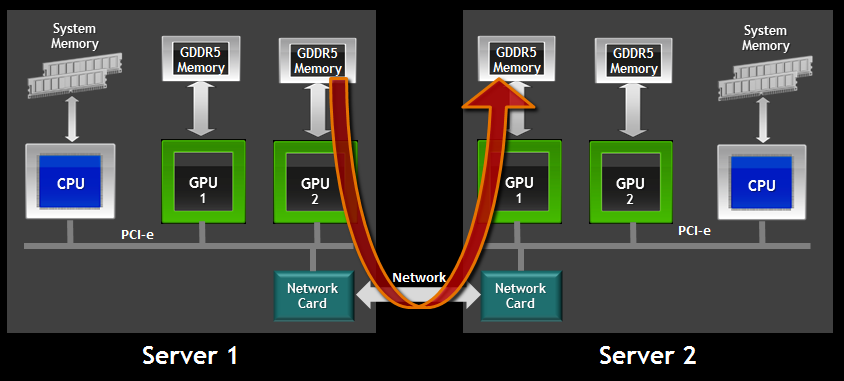
Modern computing workloads are no longer confined to a single graphics processor. From deep learning training pipelines to large-scale simulations and real-time rendering farms, multi-GPU systems have become the backbone of serious performance work. Managing those GPUs efficiently, understanding what each one is doing, and diagnosing performance bottlenecks can quickly turn into a challenge. That is exactly where tools like nvitop come into play.
In today’s high-performance computing world, relying on a single GPU is often not enough. Multi-GPU systems have become essential for demanding tasks like deep learning, large-scale simulations, 3D rendering, and scientific computing. While these systems offer tremendous computational power, they also introduce complexity: uneven workload distribution, memory bottlenecks, thermal imbalances, and difficulty tracking which processes are using which GPUs.
Nvitop at a high level
Before diving into multi-GPU specifics, it helps to understand what nvitop is designed to do. At its core, nvitop is an interactive GPU process viewer inspired by system monitoring tools like htop. Instead of focusing on CPUs, memory, and processes at the operating system level, it centers entirely on NVIDIA GPUs and their workloads.
The tool provides a real-time, terminal-based interface that shows GPU utilization, memory usage, temperature, power draw, and the processes consuming those resources. Unlike static snapshot tools, nvitop continuously updates its display, making it ideal for live debugging, performance tuning, and workload observation.
What makes NVitop particularly appealing in multi-GPU environments is that it does not treat additional GPUs as an afterthought. Multi-GPU awareness is baked into its design, allowing it to scale naturally from a single GPU laptop to a large server with multiple accelerators.
Why multi-GPU monitoring matters
Multi-GPU systems introduce complexity that single-GPU setups simply do not have. Each GPU may be running different workloads, serving different users, or operating under different thermal and power conditions. Without clear visibility, problems can remain hidden until performance degrades or hardware limits are exceeded.
Common challenges in multi-GPU environments include uneven workload distribution, where one GPU is overloaded while others sit idle, memory fragmentation across devices, which can cause unexpected out-of-memory errors, thermal imbalance leading to throttling on specific GPUs, and difficulty mapping processes to the exact GPU they are using.
Nvitop addresses these challenges by presenting GPU-level and process-level information in a unified interface. It allows you to see not only how each GPU is performing, but also how they compare to one another at a glance.
How nvitop detects multiple GPUs
The foundation of NVitop’s multi-GPU handling lies in how it detects and enumerates GPUs. When launched, nvitop queries the system for all available NVIDIA GPUs using the underlying NVIDIA management interfaces. Each detected GPU is assigned an internal identifier that corresponds to the system’s GPU indexing.
This detection process is automatic and does not require any manual configuration. If the system recognizes the GPUs, nvitop will as well. This includes GPUs connected via different PCIe slots, GPUs with different memory sizes, and even GPUs of different models within the same machine.
Once detected, nvitop treats each GPU as a first-class entity. Rather than merging their data into a single summary, it keeps their metrics separate and clearly labeled. This separation is essential for understanding how each device contributes to the overall workload.
Visual layout for multi-GPU systems
One of nvitop’s strengths is its layout design. In multi-GPU systems, clarity is everything, and nvitop’s interface is built to avoid confusion even when many GPUs are present.
Typically, each GPU is displayed in its own section or row, with key metrics shown side by side. These metrics often include utilization percentage, memory usage, and total memory, temperature and power draw, fan speed where available, and GPU name or identifier.
This structured layout allows users to scan vertically or horizontally and quickly spot anomalies. For example, if one GPU is significantly hotter than the others or shows near-maximum memory usage, it immediately stands out.
As the number of GPUs increases, nvitop adjusts the layout to fit the terminal window. While screen size can impose limits, the tool prioritizes readability by keeping the most important information visible without overwhelming the user.
Per-GPU utilization tracking
A critical aspect of multi-GPU handling is accurate utilization tracking for each device. nvitop excels here by showing real-time utilization metrics for every detected GPU independently.
Utilization typically reflects how busy the GPU’s compute units are. In a multi-GPU system, this helps you answer questions like which GPUs are actively running workloads, whether workloads are evenly distributed, and if any GPUs are underutilized or idle.
By watching utilization over time, users can identify patterns. For instance, a training job might alternate between GPUs in a data-parallel setup, or a rendering workload might heavily favor one GPU due to configuration issues. nvitop makes these patterns visible in real time.
This per-GPU focus is especially useful in shared environments, where multiple users may be running jobs simultaneously. Administrators can quickly see whether GPUs are being used efficiently or if scheduling adjustments are needed.
Memory usage and fragmentation across GPUs
GPU memory is often the most constrained resource in accelerated workloads. In multi-GPU systems, memory management becomes even more important because each GPU has its own dedicated memory pool.
nvitop displays memory usage for each GPU separately, showing both used and total memory. This makes it easy to see which GPUs are nearing capacity and which still have room for additional workloads.
Beyond simple usage numbers, observing memory patterns across GPUs can reveal deeper issues. For example, if one GPU consistently has fragmented memory or lingering allocations from previous jobs, it may fail to accept new workloads even though other GPUs appear fine.
By monitoring memory usage over time, nvitop helps users spot memory leaks, poorly terminated processes, or inefficient memory allocation strategies. This insight is invaluable when debugging complex multi-GPU applications.
Process-level visibility in multi-GPU environments
One of the defining features of nvitop is its ability to map processes to GPUs. In a multi-GPU system, this mapping becomes even more important, as multiple processes may be running across different devices simultaneously.
nvitop lists active GPU processes and associates each process with the GPU or GPUs it is using. This association allows users to answer critical questions, such as which process is consuming the most GPU memory, whether a single process is monopolizing multiple GPUs, and which user launched a specific workload.
This level of visibility is particularly useful in shared servers. If a GPU is overloaded, nvitop can quickly reveal which process is responsible, enabling faster resolution without guesswork. In multi-GPU training scenarios, seeing a single process appear across multiple GPUs can confirm that data parallelism or model parallelism is working as intended.
Handling processes that span multiple GPUs
Some workloads are designed to use more than one GPU at a time. These include distributed deep learning jobs, multi-GPU rendering tasks, and certain simulation workloads. nvitop is capable of representing these multi-GPU processes clearly.
When a process uses multiple GPUs, nvitop shows its presence under each relevant GPU. This duplication is not confusing but informative, as it highlights the shared nature of the workload. Users can see how much memory and compute each GPU contributes to the process.
This approach helps diagnose imbalances. For example, if a process uses significantly more memory on one GPU than another, it may indicate uneven data distribution or configuration errors. By presenting multi-GPU processes transparently, nvitop avoids the common pitfall of hiding complexity behind aggregated numbers.
GPU identification and naming clarity
In systems with many GPUs, knowing exactly which GPU is which matters. nvitop helps by displaying clear identifiers for each GPU, typically based on system indexing and model names.
This clarity is important when GPUs differ in capabilities. For instance, a system might include GPUs with different memory sizes or compute capabilities. nvitop’s labeling ensures users can distinguish them easily and assign workloads appropriately.
In environments where GPUs are physically labeled or mapped to specific PCIe slots, the consistency between system identifiers and nvitop’s display helps reduce errors. Users can confidently target the correct GPU when launching or debugging jobs.
Sorting and filtering in multi-GPU views
As the number of GPUs and processes grows, raw information can become overwhelming. nvitop addresses this by allowing sorting and filtering of displayed data. Users can sort processes by GPU usage, memory consumption, or other metrics. This makes it easier to identify the most resource-intensive workloads at any given time.
Filtering can also help focus on specific GPUs or users. In a multi-GPU system with many active processes, narrowing the view prevents important details from being lost in the noise. These interactive capabilities turn NVitop from a passive display into an active diagnostic tool, especially valuable in complex multi-GPU setups.
Real-time updates and responsiveness
Multi-GPU systems are dynamic. Workloads start and stop, memory usage fluctuates, and thermal conditions change rapidly. nvitop’s real-time update model ensures that users always see the current state of the system.
The interface refreshes frequently, providing near-instant feedback when changes occur. This responsiveness is crucial when diagnosing short-lived spikes or transient issues that might not appear in static logs.
For example, a brief utilization spike on a specific GPU could indicate a background process or misconfigured job. nvitop makes such events visible as they happen, allowing for immediate investigation.
Thermal and power monitoring across GPUs
Heat and power are critical concerns in multi-GPU systems. Uneven cooling or power delivery can lead to throttling, reduced lifespan, or unexpected shutdowns. Nvitop shows temperature and power metrics for each GPU individually. This per-GPU monitoring allows users to identify hotspots or power-hungry devices quickly.
If one GPU consistently runs hotter than others, it may indicate poor airflow, a failing fan, or an unusually heavy workload. By spotting these issues early, users can take corrective action before performance suffers. Power monitoring is equally important in systems with strict power budgets. Nvitop helps ensure that total GPU power draw stays within safe limits while still delivering maximum performance.
Multi-user environments and access awareness
Many multi-GPU systems are shared among multiple users. In such environments, transparency and accountability are essential.
nvitop displays user information alongside processes, making it clear who is using which GPU and how much of its resources are consumed. This visibility supports fair resource sharing and helps administrators resolve conflicts.
When GPUs are oversubscribed, nvitop can reveal whether the issue stems from a single user running multiple jobs or from many users each running small workloads. This insight enables informed policy decisions and better scheduling.
Two practical advantages of NVitop in multi-GPU systems
There are many benefits to using NVitop in multi-GPU environments, but two stand out for their practical impact:
- Immediate visibility into GPU distribution, allowing users to see at a glance whether workloads are balanced or skewed toward specific devices
- Faster troubleshooting by directly linking processes, users, and GPUs without relying on indirect logs or delayed metrics
These advantages make NVitop a daily driver for many professionals who rely on multi-GPU systems.
Scaling from small to large GPU counts
Nvitop is designed to scale gracefully. Whether you are monitoring two GPUs in a desktop or eight or more GPUs in a server, the core principles remain the same. As GPU count increases, the importance of efficient layout and clear labeling becomes even greater. nvitop maintains consistency in how it presents information, reducing the learning curve when moving between systems of different sizes. This scalability makes nvitop a reliable choice across diverse environments, from personal workstations to enterprise-grade compute nodes.
Integration into workflows and habits
Tools are only useful if they fit naturally into daily workflows. nvitop’s terminal-based design makes it easy to integrate into existing habits, especially for users who already rely heavily on command-line tools. In multi-GPU setups, users often keep nvitop running in a separate terminal pane, providing continuous visibility while other commands are executed.
This persistent presence helps catch issues early and builds an intuitive understanding of system behavior over time. The low overhead and simplicity of launching nvitop further encourage frequent use, which in turn leads to better resource management.
Comparison with single-GPU monitoring behavior
It is worth noting how nvitop’s behavior changes when moving from single-GPU to multi-GPU systems. In single-GPU setups, the tool focuses on depth, showing detailed metrics for that one device.
In multi-GPU setups, it balances depth with breadth. While some per-GPU detail may be condensed to fit the display, the overall picture becomes richer, showing relationships and contrasts between devices. This adaptive behavior ensures that nvitop remains useful regardless of system complexity.
Common multi-GPU scenarios and how nvitop helps
Multi-GPU systems are used in many different contexts, and nvitop adapts well to each. In deep learning training, nvitop helps verify that all GPUs are actively participating and that memory usage is consistent across devices.
In rendering farms, it reveals which GPUs are handling which frames or tasks. In research clusters, it supports fair sharing by making usage transparent. Across these scenarios, the core value remains the same: clear, real-time insight into how GPUs are being used.
Two situations where Nvitop shines the most
While nvitop is useful in many contexts, it truly excels in the following situations:
- Debugging performance issues where one GPU underperforms compared to others, revealing bottlenecks or misconfigurations
- Managing shared multi-GPU servers, where quick identification of resource-hogging processes prevents conflicts
These use cases highlight why nvitop has become a trusted tool among professionals.
Limitations to keep in mind
No tool is perfect, and it is important to understand NVitop’s limitations. Being terminal-based, it relies on sufficient screen space to display many GPUs clearly. Extremely large GPU counts may require careful window management.
Additionally, nvitop focuses on monitoring rather than control. While it excels at showing what is happening, it does not directly manage scheduling or enforce policies. Users must pair it with other tools or practices for full system management. Understanding these boundaries helps set realistic expectations and encourages complementary solutions.
Best practices for using NVitop in multi-GPU systems
To get the most out of nvitop, users should develop a few habits. Regularly monitoring GPU usage helps build intuition about normal behavior. Comparing GPUs against each other makes anomalies easier to spot.
In shared environments, encouraging all users to be familiar with nvitop promotes transparency and cooperation. When everyone understands how their workloads affect the system, conflicts become easier to resolve. Over time, nvitop becomes less of a diagnostic tool and more of a dashboard that guides daily decisions.
Conclusion
Multi-GPU systems are powerful, but that power comes with complexity. Understanding how each GPU behaves, how workloads are distributed, and how resources are consumed is essential for maintaining performance and stability. nvitop addresses this need with a thoughtful, real-time approach that scales naturally with system size.
By clearly detecting and separating GPUs, presenting per-device metrics, mapping processes accurately, and updating in real time, nvitop makes multi-GPU monitoring both effective and intuitive. It empowers users to see what is happening now, understand why it is happening, and respond quickly when something goes wrong.